Embossed Birds ‘n’ Trees Card

Embossed Birds ‘n’ Trees Card

aDSCN5963.jpg

This card was made for the Perfectly Rustics Challenge No. 36 – Embossing – where we are to use wet or dry embossing on our project. (http://perfectlyrustics.com/2014/11/17/prdc-36-embossing/).

For the background panel on this card, I used the Sizzix “Stamp & Emboss – Birds ‘n’ Trees” set which includes both the embossing folder and coordinating large background stamp.  I stamped the background on My Mind’s Eye Nutmeg “Boy” Southwest Paper from the Indie Chic collection using Gina K Warm Cocoa ink first.  Then the images were lined up in the embossing folder and run through my Cuttlebug.  The Greeting was from the Gina K Designs “Winter Cheer” stamp set and was stamped using Gina K Dark Chocolate ink.  The My Mind’s Eye card stock is heavily textured which made it difficult to get clean, stamped images so I used my MISTI to stamp the background and greeting because I needed to stamp them each multiple times.  (For more information on the MISTI, check out my earlier post HERE.)  Gina K Warm Cocoa card stock was used for the mats and card base.  I added some ribbon, twine and a mini wooden snowflake ornament I got at Michaels (this is the smaller of the two sizes that came in the pack of 20) to finish off this simple card.

Thanks for checking out my card project!

This content uses referral links as described in the disclosure policy on my sidebar.

Flowers in Vase Sympathy Card – Original Post

Flowers in Vase Sympathy Card – Original Post

Flowers in Vase Sympathy Card DSCN6075.jpg

I have a lot of trouble coming up with ideas for sympathy cards in general, and my mind basically shuts down when I actually need one.  I probably should make a few (when I don’t actually need them) just to have on hand.  I really struggled with this one for our neice whose father recently passed away.  But I finally finished it.

A mask was made using the Spellbinders Deckled Rectangles.  The background panel was then stamped (using the mask) with the Rubbernecker Stamps “French Script BKG” stamp and Tim Holtz Frayed Burlap Distress Ink on Gina K Pure Ivory card stock.  Then, a second mask was used to create the two squares over the script to add a bit of color.  The inks used were Memento Elderberry and Stampin’ Up Pistachio Pudding.  Using the deckled rectangle mask again, the area over the script and squares was lightly inked using Memento Elderberry.  The sentiment stamp was from the Gina K Designs “With Love and Prayers” stamp set and was stamped with the frayed burlap ink.

The flowers were made using the Heartfelt Creations “Sun Kissed Fleur” die and the “Sun Kissed Fleur PreCut Stamp” for detail.  They were stamped and sponged with Stampin’ Up Soft Suede ink on Stampin’ Up Pistachio Pudding card stock.  Buttons and jute were added to the centers.  I made several of these flowers when I made my Thinking of You Card back in October and had saved the extras to use later.  (Originally, I had stamped flowers directly onto this card base over the inked squares but decided to use these 3D flowers and the vase instead.  I may have positioned the squares differently had I thought of this earlier.)

The two layers of the vase were cut with the Spellbinders Filigree Vase dies from Gina K Edible Eggplant card stock.  The vase and the flowers were adhered to the ivory panel using pop dots.

I hand-embossed the lines around the edges of the ivory panel using a score board.  The card base was made from Gina K Edible Eggplant card stock.

Thanks for checking out my card project.

This content uses referral links as described in the disclosure policy on my sidebar.

Embossed Snowman – Original Post

Embossed Snowman – Original Post

Embossed Snowman DSCN6057.jpg

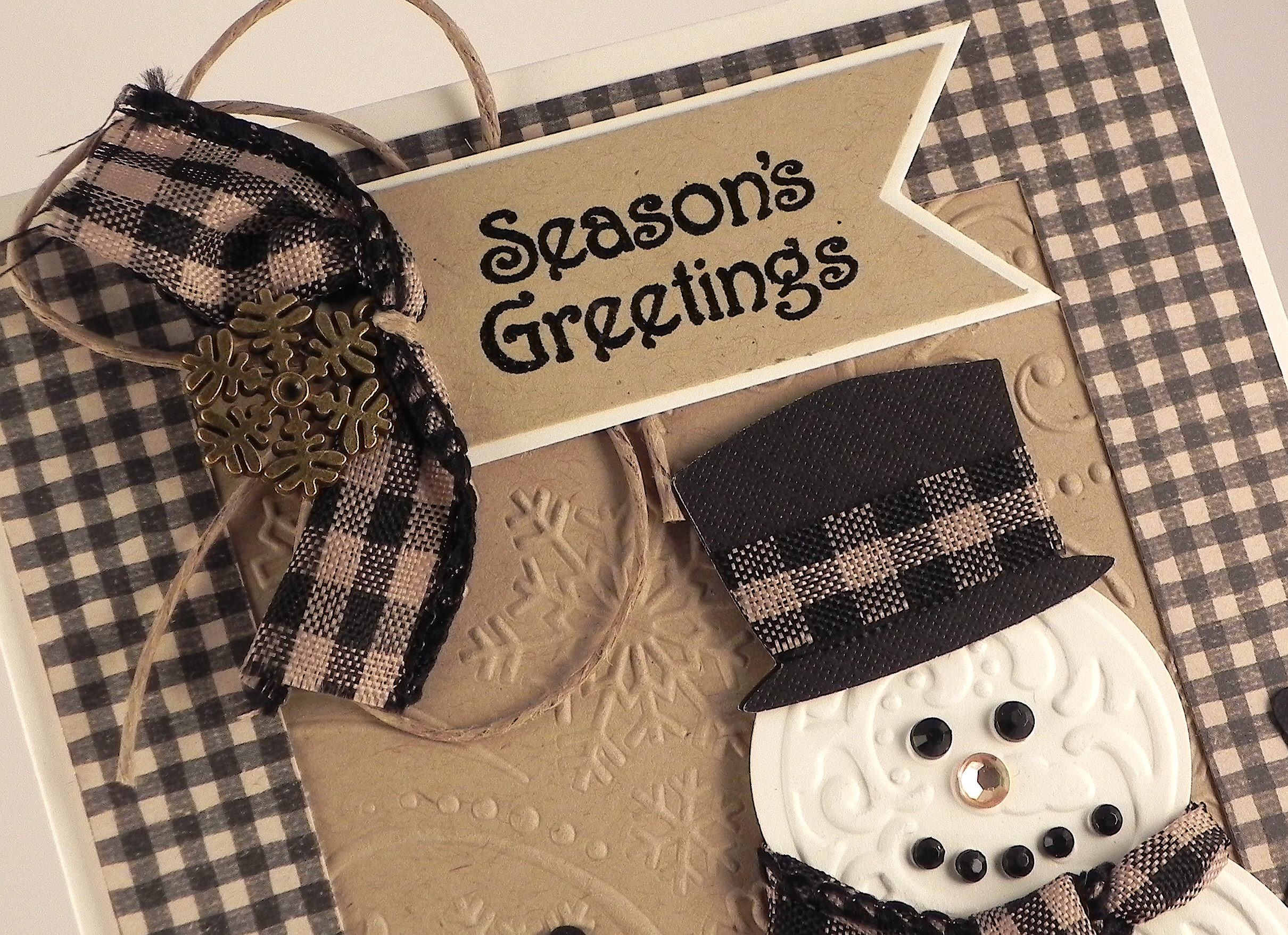
The snowman on this card was made with the Sizzix Snowman & Hat Bigz die which also came with a bonus embossing folder that fits the die.    The snowman was cut from Gina K Pure Ivory card stock, and the hat was cut from a scrap of textured black DCWV card stock.  The arms were cut freehand from a scrap of black.  Ribbon and gems were added to finish him off.

The background panel is Gina K Kraft card stock embossed with the Darice Snowflake Swirl folder.  The frame was cut using my trimmer from a piece of Pebbles “Mary” card stock from the Walnut Grove collection.  The Card base is Gina K Pure Ivory.

The greeting stamp is from the Gina K Designs “Winter Cheer” set and was stamped with versamark and heat embossed with gina k black embossing powder on kraft card stock and matted on pure ivory.  A scrap of ribbon, jute and a glittered, wooden mini snowflake ornament from Michaels were added to the greeting banner.

In later versions of this card, I used metal snowflakes instead of the wooden ones because I ran out of them.  I also changed the greeting using a stamp from the Hampton Arts “Outlines – Season’s Greetings” stamp set.

metal snowflake DSCN7413

This card was made for the Perfectly Rustics Challenge No. 36 – Embossing – where we are to use wet or dry embossing on our project. I used both.  (http://perfectlyrustics.com/2014/11/17/prdc-36-embossing/)

Thanks for checking out my card project!

This content uses referral links as described in the disclosure policy on my sidebar.

Have An Udderly Wonderful Christmas!

Have An Udderly Wonderful Christmas!

Have An Udderly Wonderful Christmas card DSCN5956

This card was made for the Mod Squad Challenge called – Timed Challenge!  One Layer Card – where we were to make a one layer card and note how long it took to complete – the quicker the better!  (Sadly, this site is no longer active.)

First of all, this card was FUN to make!  I had ink pads flying out of my hand, washi tape everywhere, and a mess on my desk that appeared faster than I ever thought possible!  (Somehow, I ended up with a cut on the back of my hand that I have no idea how I got!)  When I finished, I was imagining all us crazy crafters working at the speed of light, and I just started cracking up!  (It’s a good thing I was home alone at the time because I’m sure I sounded a little crazy!!)  I was so giddy and charged up that I actually considered a glass of wine until I realized it was only 8:30 in the morning so I chose to skip my second cup of coffee instead.  PHEW!!!

I included making the card base, setting up my stamp-a-ma-jig image templates and cutting my Washi tape in my reported times.  (I had already pulled out the stamps I wanted to use.)  Without the hats, this card was done in 2 minutes and 24 seconds.  Here is what it looks like without the hats:

cDSCN5898

The total time to make the card when you include stamping and coloring the hats, fussy cutting them, running them through the sticker maker, and adhering them to the card was 5 minutes and 58 seconds.

To make this card, I started with a Gina K Pure Ivory card base.  I taped a piece of Recollections “Gift It Christmas” Washi Crafting Tape onto my paper trimmer and sliced it in half lengthwise (it was originally 1 1/8 inch wide.) and adhered a strip to the top and bottom of my card base.  I stamped all the images in Memento Tuxedo Black ink and used the stamp-a-ma-jig for placement.  The greeting is by “I Break For Stamps.”  The cows are from the Gina K Designs “Primitive Blessings” set, and the hats are from the Gina K Designs “Winter Cheer” set where I stamped the two snowmen and the penguin on white scrap paper, colored the hats with Copic Markers R29 and E40, and then fussy cut the hats, ran them through my mini xyron sticker maker and adhered them to the card.

I discovered a few time savers as I worked through my initial plan.  The first time I tried cutting the washi tape, I started with a piece just slightly longer than the width of the card base.  I couldn’t get the two “halves” to be perfectly even; I’m not sure why since I was using the marks on the trimmer. (Probably because I was rushing!)  So then I just took a piece that was about a foot long and cut that in half.  The one strip was big enough to cover the top and bottom and was uniform in size since it started out as one piece.  The other half could be used for a second card or to decorate the inside of the card or the envelope.  I hadn’t use Washi tape much before, and I was pleasantly surprised at how easy it was to work with.  It is pretty forgiving in that you can easily remove it from your project if necessary, but it seems to stay put when you are done with it. Since I was rushing, it kept tangling and sticking to itself, but it was really easy to separate and flatten it.  It is also really thin, so it adds no bulk to your card at all.

To get the hats, I placed all three stamps on the same, large acrylic block and stamped them all at once.  The other thing that saved a bit of time was coloring the hats before they were cut out.  I was able to color them quickly while not worrying about going out of the lines since that would all be cut away.  I also realized that I needed to color in the ivory color (brick white) first.  When I used the red first, it seemed to want to bleed into the brick white.  This didn’t happen as much when the brick white was already there and dry.

I’m not sure I would be able to keep up the fast pace if I were making lots of these cards, but they are definitely simple enough to mass produce in a reasonable amount of time!  (Now, if I could just figure out how to do speed-photography and speed-blog-posting!!!)

aaDSCN6051

Thanks for checking out my card project!

This content uses referral links as described in the disclosure policy on my sidebar.

MISTI

MISTI

I must confess that I am a bit of a “craft tool addict” and get much pleasure in purchasing and trying out all the latest tools and gadgets that I can get my hands on.  I see a project I like, and I immediately check out the supply list and the tools that were used!  Anyway, I recently discovered a tool that looked very interesting.  (Thanks for sharing this, Verna!)  It is called the MISTI (Most Incredible Stamp Tool Invented).

MISTI

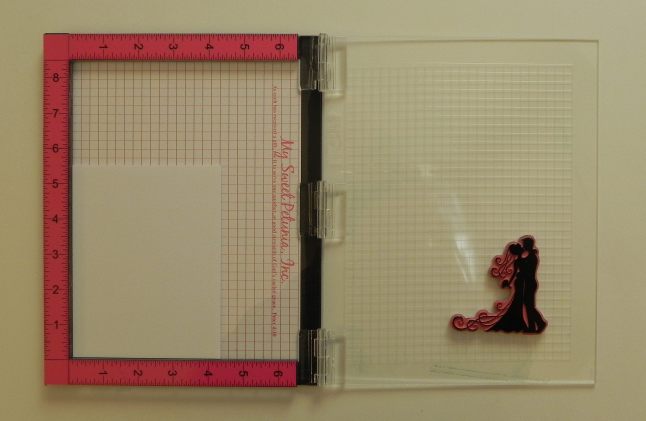
Very briefly, you use this by placing your stamp (clear or red rubber cling) on the acrylic lid.  The paper is placed on the black foam (or in that section with the foam removed).  When the stamp is inked up and the lid is closed, the stamp comes in contact with the paper and your image is produced.  If you open the lid and close it again, the stamp hits the paper in the exact spot it did the first time.  You can see the You Tube video describing and demonstrating it HERE.


Why the MISTI looked interesting to me:

I often have trouble fixing a less than perfectly stamped image when parts of the image did not stamp or when there was uneven ink transfer.  This can happen with any stamp, but I often have trouble with large frame and background stamps or with larger solid image stamps.

I use a stamp-a-ma-jig a lot when I need precise placement of my stamps, and I really like it and get great results with it.  I use it to try to fix poorly stamped images as well.   However, because there is a small amount of human error involved with lining up the stamp against the stamp-a-ma-jig positioning tool, my stamped image sometimes ends up less than perfect when I need to go over the image a second time.  Sometimes it works great, and sometimes I get an image that looks a little blurry because it is just a touch off.  The MISTI works like a stamp-a-ma-jig in that the stamp is placed on and remains in a fixed position on the acrylic block, but the hinge keeps the acrylic lid from changing position so you know exactly where the image will end up no matter how many times you stamp it. Because re-stamping is so easy, you get great results when trying to get a darker or more solid image with the solid stamps as well because you can stamp and re-stamp as many times as necessary to get the desired results.

I also have a bit of trouble using the stamp-a-ma-jig with the really large acrylic blocks; I find it hard to line up these blocks against the positioning tool properly.  With the MISTI, you line up your stamp using the grid marks provided (or by initially placing the stamp right on your paper where you want it), and then it stays in position on the acrylic lid until you are done with it.

There are several videos demonstrating how to use MISTI for perfect placement of stamps, for creating backgrounds and for general stamping tips. Check them out at http://mysweetpetunia.com.


Here are a few of the images I stamped using the MISTI so you can see how it works.

This first example is with the bride and groom stamp from Gina K Designs “Always and Forever” duo stamp set.  It’s a large, solid stamp that  makes a silhouette type image.  Because this is a red rubber cling stamp, I’ve removed the foam insert from the left side of the MISTI.  I placed my paper in the lower left corner, although you can place it anywhere as long as it stays in the same place until you are done stamping the image.
060 DSCN5826

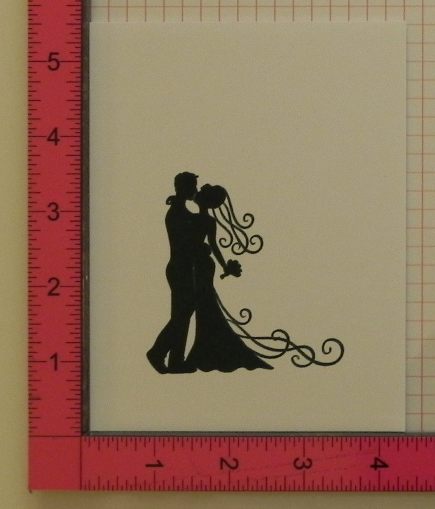
I stamped the image by inking up the stamp and closing the acrylic lid.  Without moving the paper, I re-inked the stamp and closed the lid again.
    080a DSCN5832

For comparison purposes, the image on the left was stamped the traditional way using an acrylic block on foam on a table, and the image on the right is the one from the MISTI, stamped several times.  Both were stamped with Gina K Christmas Pine ink.  (There is nothing wrong with the left image.  It is beautiful and could be used as is, but if you want a richer image, it is easier to achieve it with the MISTI because you can stamp it and re-stamp it.)

090 DSCN5836

For this next sample, I am using a clear stamp so I put the foam insert into the left side of the MISTI.  (I ordered additional grid paper that can be place on top of the foam if needed for placement, but there is also a built in grid on the acrylic lid.  I also just discovered that there is a downloadable grid on the site where this is sold as well.)  I am using the optional magnets I purchased to hold my paper in place.  For this sample, I intentionally stamped the image very lightly to get an incomplete image.  The stamp is from the Gina K Designs “Fabulous Frame” stamp set.

140 DSCN5854

Leaving the paper in place, I re-inked the stamp and closed the lid again.  Perfect!

150 DSCN5857  160 DSCN5859

Here is one more comparison where the image was stamped traditionally using an acrylic block on a table (pictured on the left) and with the MISTI (pictured on the right, stamped several times).  This stamp comes from the Gina K Designs “Inspiration Mosaic” stamp set.

040 DSCN5822  050 DSCN5825


My MISTI just arrived in the mail yesterday, but here are my initial thoughts:

  • I can see this tool being really helpful for use with stamps from which I often have trouble getting good images and for re-stamping when needed.
  • I can see this tool being really helpful for making multiple copies of a stamped panel by leaving the stamp in place and replacing the paper in the exact same spot.
  • It works great with clear and red rubber cling stamps.  You cannot use it with wood mounted rubber stamps as they are too thick and the wood can’t cling to the acrylic lid.
  • I am not sure if this will replace my stamp-a-ma-jig or will be an additional placement tool; that remains to be seen!
  • I have not had this tool long at all (a day!) so I cannot comment on its durability.
  • My MISTI squeaks when the lid is opened and closed, and I noticed that it squeaks on the You Tube video as well.  I’m not sure if that will go away with use.  (Not a big problem for me at this point, and she claims it will stop squeaking with time in her FAQ section on her blog.)
  • The part where you place your paper is not large enough to hold a whole piece of 8 1/2 x 11 paper (or 12 x 12 for scrapbooking) so the paper must be trimmed before you can stamp. (REVISION (1/13/15):  CHECK OUT BANJO58’s COMMENT BELOW FOR A WAY TO USE LARGER PAPER – AWESOME SUGGESTION.  THANKS FOR THE TIP!)

Overall, the positives seem to FAR outweigh the negatives at this point, and I look forward to using this tool a lot!!

ADDITION TO POST (1/13/15) – I’VE BEEN USING THIS TOOL A LOT SINCE I’VE GOTTEN IT AND ABSOLUTELY LOVE, LOVE, LOVE IT.  I AM ACTUALLY CONSIDERING ORDERING A SECOND ONE AS THERE ARE MANY PROJECTS I HAVE WORKED ON RECENTLY WHERE SEVERAL STAMPS WERE USED ON PROJECTS THAT I WANTED TO DUPLICATE (LIKE CHRISTMAS AND THANK YOU CARDS).  HAVING MORE SURFACE SPACE TO KEEP STAMPS POSITIONED WOULD BE AWESOME. DEFINITELY NOT NECESSARY, BUT REALLY NICE.  BIRTHDAY, MAYBE?….. 🙂


To order a MISTI, go to mysweetpetunia.com or amazon.com.

At this point, she sells out quickly.  I signed up to follow her blog by email and received word that she was going to have them available for sale at 9:30 (central time) last Friday.  By 9:33 she was sold out! I’m not sure how many she had to sell, but I was lucky enough to get my order in before they were gone!  I actually put the additional items I wanted (grid paper, magnets to hold the paper in place, and the recommended cleaning solution) in my cart earlier in the day and kept the page open and up on my computer until it was sale time.  I had set a timer so I wouldn’t forget or lose track of time (am I crazy?!), and at 9:29 I started refreshing the page until the item became available.  At this point, all I had to do was add it to my cart and pay which was done with paypal so I just had to enter my password and was pretty much finished.  A little stressful, but worth it!  (Reminds me of the Tickle Me Elmo and Wii frenzies!!)  I placed my order on Friday night, and it was delivered on Monday.  Pretty awesome!

UPDATE (March 20, 2015): IT APPEARS THAT THE MISTI IS NOW IN STOCK (AND MUCH EASIER TO ORDER!) AND AVAILABLE AT mysweetpetunia.com or at amazon.com. (March 20, 2015)


This really may be the Most Incredible Stamp Tool Invented!  (Sorry, I couldn’t resist!)

Thanks for checking out my post!

This content uses referral links as described in the disclosure policy on my sidebar.